See stations around you
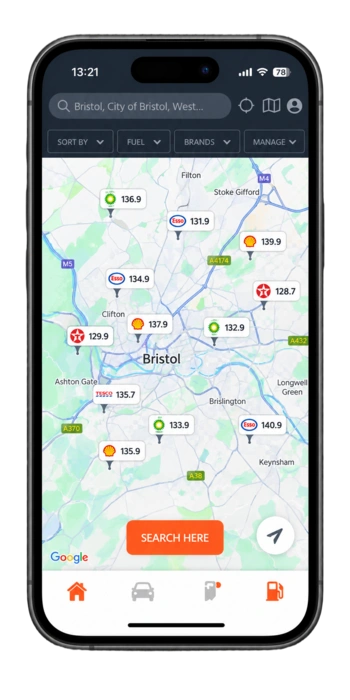
Start with your current area or search another UK location. The map makes the distance between options easier to understand at a glance.
128.7131.9132.9
 Octavia
Fuel
Octavia
Fuel
Fuel decisions, made clearer
Octavia Fuel helps UK drivers find nearby petrol stations and compare available fuel prices before setting off.
Octavia Fuel is the name of this promotional website. Download links open PetrolPrices, published by Automate App Limited, in an external app store.
Screens and fuel prices shown on this page are illustrative, not live quotes.
One useful view
The service brings the information drivers check most often into one simple journey, from an initial search to directions.
Start with your current area or search another UK location. The map makes the distance between options easier to understand at a glance.
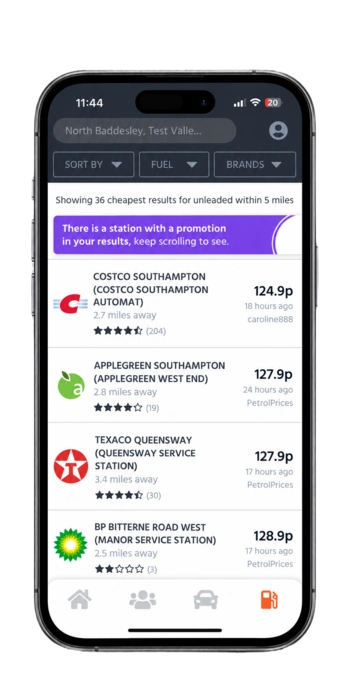
Arrange nearby results by the information that matters for the trip, including price or distance.
Once a station suits the journey, move from comparison to route planning without losing context.
Inside the app
See stations and price markers across a wider location before narrowing the choice.
Compare listed stations, distance and available fuel prices in a clear results view.
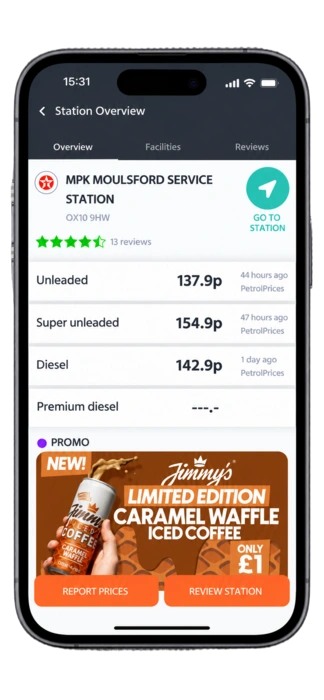
Review the station overview and the fuel types shown before asking for directions.
A calmer way to choose
A short detour can change which station makes sense. Octavia Fuel helps drivers weigh visible price information against distance, so the choice fits the journey rather than a single number.

From search to forecourt
No long setup. Open the app, look at the area and compare the options shown for the journey.
Use your location or search for a UK place where you plan to refuel.
Look across the visible price and distance information to understand the choices.
Open the selected station and continue to directions when you are ready.
Ready when the tank is not
Download the listed PetrolPrices app for iPhone or Android and start comparing stations around your next route.